radio-code.com


Home

Testimonials
Retrieve Code
Unlock Manuals
Contact Us


General Motors radio code

Retrieve your General Motors "TheftLock" radio code now!


Our code retrieval process is for General Motors vehicles that were sold or manufactured in the United States or Canada!

For United Kingdom vehicles see: 

Other vehicles available


Since 1998, many company's in the automotive industry have relied on our radio unlock code service to get their customers up and running! Now you can get the same great service at radio-code.com! Serving the industry since 1998.


Orders are processed

Monday - Sunday


Many General Motors vehicles come equipped with radios that require a special security unlock code. This radio code is not required, unless the radio is removed from the vehicle, or the vehicles battery is disconnected.

General Motors radios are quite different from most other manufacturers, as GM allows you to enter your own code. Most manufacturers will come with the radio security code already stored to into its processor.

Never fear however, if the previous owner has entered their unique radio code, as our radio code retrieval process will override any other code that has been entered into the unit!

General Motors calls this feature "TheftLock". Its purpose is to prevent unauthorized users of your radio and will not allow your stereo to operate without the proper code.

General Motors began using the antitheft feature, "TheftLock" around the 1990's and is still used in many GM vehicles.

You will find "TheftLock" radio code feature on most Pontiac, Cadillac, GMC, Chevrolet, Saturn, Geo, Oldsmobile, Hummer and Buick vehicles.


Retrieving your GM radio code is simple and quick!

Simply follow the steps below.   


Step 1 - Determine radio type

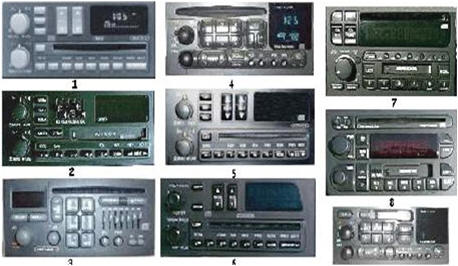
Your radio may look like one or more of the following units, or a similar version, may vary from model to model.

Your radio may not be pictured here.


RDS Radios

We do not support code retrieval for any RDS unit. For more information:

unit.

See unlock manuals

Your radio will indicate on the front if it is a RDS


Step 2 -  Retrieve radio serial#


Section 1.B


CAUTION!
We will not respond to any "General Motors code retrieval" email, without receiving a paid receipt from Pay Pal !


The radio must be in LOC mode NOT in INOP mode.
Example . If you have activated the Theft-Deterrent feature of your radio and loose power, the radio goes into LOC (theftlock) mode. With the ignition on, you must use the MN and HR buttons to enter you personal code in order to unlock it. If you fail to enter the correct code eight (8) times, the radio goes into INOP mode. You have to wait an hour with the ignition on before the radio returns to LOC mode procedure:


1. Turn the ignition ON (The radio displays LOC)

2. Press and hold presets buttons 2 & 3 or 1 & 4 for approximately 10 seconds.

3. The radio display changes from LOC to a three-digit number. Write this number down.

4. Don’t take long, fifteen seconds max before the next step.

5. Press the AM/FM button

6. The radio display changes to another three-digit number. Write this number to the right of the first one.

7. You now have a six or four-digit number, the first three digits are from STEP 3 and the last three digits are from STEP 5

8 If you have a four digit number, it will show all four digits at the same time. Example 4523


  • Note1: You may have two sets of the same number. Example- (233-233).

  • Note1: Saturn and GEO Vehicles only require a four Digit Serial #

  • The fourth digit will be half the size of the first three digits on Saturn and GEO Vehicles .


Step 3 - Purchase code


GM radio code retrieval


You must include ALL of  the following information in order to retrieve your code!


Failure to do this will only delay your retrieval process.


Vehicle - Make / Model :


Email address : 

Your order will be emailed to your Pay Pal account address. The email address that you place here will serve as a "backup" only.                                                             


4 or 6 digit radio serial #
See section 1.B  line 3-6 above


Where did you find us:                                                                   


Click here to purchase.

Price $3.99


 Questions

      and

          Answers


Q. How long does it take to receive my radio unlock code?

A. Usually within 30 minutes to 24 hours,

(after receiving radio information, radio serial#, radio model# etc).


Q. How will I get my code?

A. All codes are sent via email.


Q.It has been 24 hours and I still have not received my code.


A:

  • We have not received your radio information via email, (Radio serial# Model# etc).


  • We have attempted to email your information but it comes back "undeliverable mail".( Make sure all "email blocking" software is off ).


  • Email sent to us is incorrect (Check email sent to us for incorrect spelling or send alternative email address).


  • No telephone number was sent to contact you in the "telephone# field"


  • The Telephone number sent was incorrect.


  • The serial# sent was incorrect (Recheck radio serial# and model# for accuracy).


Copyright 2006 radio-code.com